Lattice Definition
Lattice structures in LAURA provide a hierarchical way to organize accelerator elements into sections and
complete beam paths. The lattice system is built on three main classes that progressively combine elements into
larger structures: sections, layouts, and the complete machine model.
These classes work together to define the full accelerator lattice, from individual elements up to complete beam paths through the machine.
These classes are outlined below; refer to Fig. 2 for an inheritance diagram.
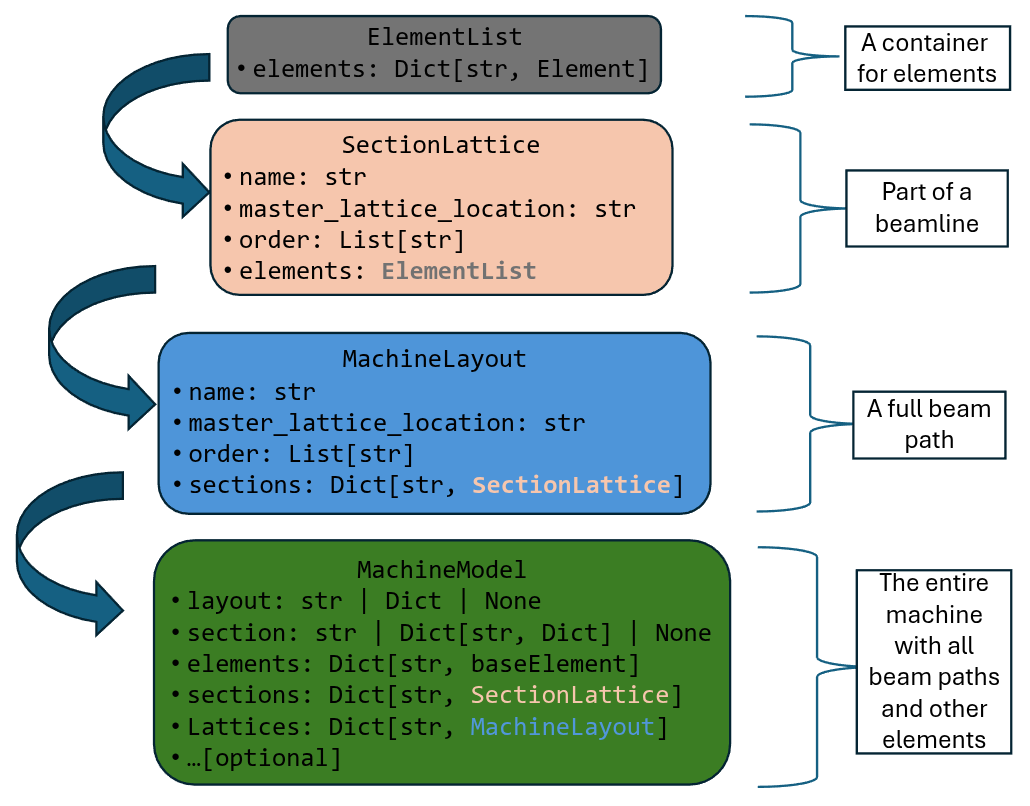
Fig. 2 Class structure of LAURA sections, lattices and machines.
Element List
The ElementList class provides a container for an unordered dictionary of element objects. It is used to manage collections of baseElement instances, typically within a section lattice.
Attributes:
elements: Dict[str, baseElement | None]: Dictionary of element objects, keyed by their names.
Key Methods and Properties:
names: Returns a list of element names contained in the list.index(element): Returns the index of an element (by name or object).list(): Returns a list of all element objects.
Example Usage:
from laura.models.elementList import ElementList
from laura.models.element import PhysicalBaseElement

element_list = ElementList(
    elements={
        "cavity1": PhysicalBaseElement(
            name="cavity1",
            hardware_class="RFCavity",
            hardware_type="RFCavity",
            machine_area="INJ",
            physical={
                "middle": [0, 0, 0.2],
                "length": 0.4,
            }
        ),
        "quad1": PhysicalBaseElement(
            name="quad1",
            hardware_class="Magnet",
            hardware_type="Quadrupole",
            machine_area="INJ",
            physical={
                "middle": [0, 0, 0.6],
                "length": 0.1,
            }
        ),
        "cavity2": PhysicalBaseElement(
            name="cavity2",
            hardware_class="RFCavity",
            hardware_type="RFCavity",
            machine_area="INJ",
            physical={
                "middle": [0, 0, 1.0],
                "length": 0.2,
            }
        )
    }
)

print(element_list.names)  # ['gun', 'solenoid']
cav1 = element_list["cavity1"]
idx = element_list.index("quad1")
all_elements = element_list.list()
Section Lattice
The SectionLattice class represents a section of a lattice,
consisting of an ordered list of elements along a beam path. Each section typically corresponds to a specific
area or functional region of the accelerator.
A section lattice must define:
name: str: The name of the lattice section.order: List[str]: An ordered list of element names defining the sequence along the beam path.elements: ElementList: A container holding the actual element objects.master_lattice: str | None: Optional top-level directory containing lattice files.
Key methods and properties include:
names: Returns a list of element names in the section.createDrifts(): Automatically inserts drift spaces between elements based on their physical positions.get_s_values(as_dict, at_entrance, starting_s): Calculates the cumulative S-position values for elements along the beamline.
Example usage:
from laura.models.elementList import SectionLattice

section = SectionLattice(
    name="injector",
    order=["cavity1", "quad1", "cavity2"],
    elements=element_list
)
s_positions = section.get_s_values(as_dict=True, at_entrance=True)
Machine Layout
The MachineLayout class represents a complete beam path
through the accelerator, composed of multiple SectionLattice
instances arranged in sequence.
A machine layout defines:
name: str: The name of the layout/beam path.sections: Dict[str, SectionLattice]: Dictionary of lattice sections, keyed by section name.master_lattice: str | None: Directory containing lattice files.
Important methods include:
get_element(name): Returns the element object for a given element name.get_all_elements(element_type, element_model, element_class): Returns filtered lists of elements.elements_between(start, end, element_type, element_model, element_class): Returns elements within a specified range along the beam path._get_all_elements(): Returns all elements in the layout in order.
The layout automatically handles element ordering and can filter elements by various criteria:
from laura.models.elementList import MachineLayout

layout = MachineLayout(
    name="main_beam",
    sections={"injector": inj_section, "linac": linac_section}
)
quads = layout.get_all_elements(element_type="Quadrupole")
Machine Model
The MachineModel class represents the complete accelerator model,
containing all possible beam paths, sections, and elements. This is the top-level class for managing the entire
lattice structure.
The machine model includes:
layout: str | Dict | None: Definition of available beam paths, either as a file path or dictionary.section: str | Dict[str, Dict] | None: Definition of sections and their elements.elements: Dict[str, baseElement]: Complete dictionary of all elements in the machine.sections: Dict[str, SectionLattice]: All section lattices available in the model.lattices: Dict[str, MachineLayout]: All machine layouts (beam paths) defined.master_lattice: str | None: Directory containing lattice YAML files.default_path: str: The default beam path to use when not explicitly specified.
Key functionality:
get_element(name): Retrieve any element by name from the full machine.get_all_elements(element_type, element_model, element_class): Filter all machine elements by criteria.elements_between(start, end, element_type, element_model, element_class, path): Get elements within a range on a specific beam path.append(values)/update(values): Dynamically add new elements to the model.
The machine model supports multiple beam paths and can automatically build sections from elements if no explicit section definition is provided:
from laura.models.elementList import MachineModel

model = MachineModel(
    layout="layouts.yaml",
    section="sections.yaml",
    elements=all_elements
)

# Get elements along default path
elements = model.elements_between(
    start="gun",
    end="dump",
    element_type="Quadrupole"
)

# Access specific beam path
bypass_elements = model.elements_between(
    start="split",
    end="merge",
    path="bypass_line"
)
The machine model automatically manages the relationships between elements, sections, and layouts, ensuring
consistency across the entire lattice definition. It provides both dictionary-style access (model["element_name"])
and method-based queries for flexible interaction with the lattice data.